Key Ghosting Test: Check Keyboard Rollover Free Online (2026)
Key ghosting test: Instantly check your keyboard rollover online. Learn N-Key vs 6KRO, fix ghosting issues, and test simultaneous key presses free. No download!
Key ghosting test tools reveal whether your keyboard can handle multiple simultaneous key presses. If you are gaming and pressing W + Shift + Space but your character won’t jump, you are experiencing keyboard ghosting. This comprehensive guide explains what causes these failures, why they ruin gaming performance, and how to evaluate your hardware’s rollover capability for free online without downloading any software.

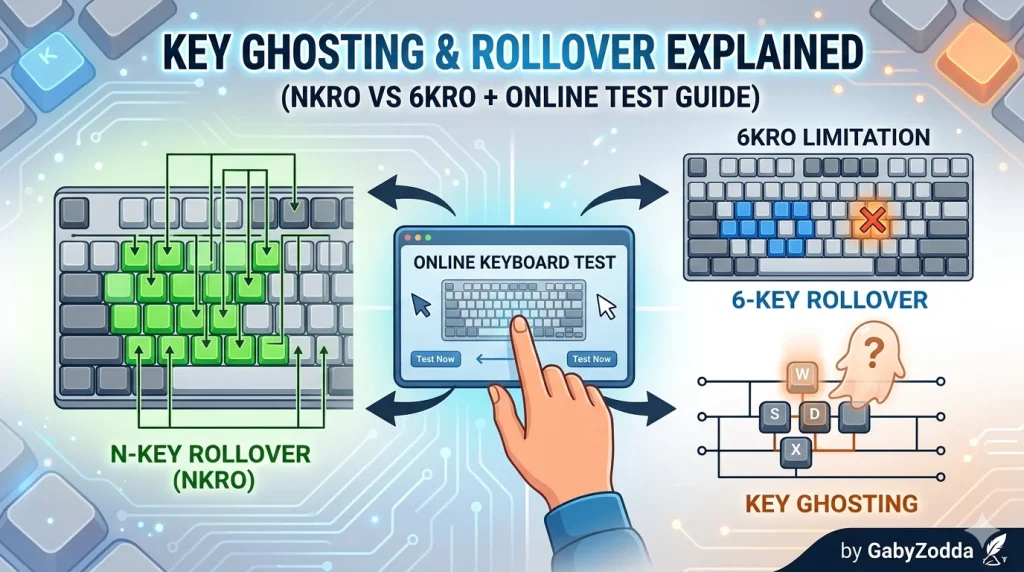
Visual guide to understanding matrix limitations affecting input detection
👻 Free Online Checker
Evaluate how many keys your hardware registers simultaneously — discover your rollover type instantly.
What Is Keyboard Ghosting?
Ghosting occurs when you press multiple keys simultaneously and some inputs disappear — or phantom “ghost” keys appear unexpectedly. Running a key ghosting test exposes this hardware limitation immediately. Most standard keyboards use matrix designs that cannot distinguish certain three-key combinations, causing missed inputs during intense gaming sessions.
When you evaluate your hardware, you are actually testing the electrical matrix. Cheap rubber dome models typically use 2KRO (2-Key Rollover), meaning they only register 2 simultaneous inputs. Gaming-oriented mechanical options offer 6KRO or NKRO (N-Key Rollover), registering 6 or unlimited keys respectively.
N-Key Rollover vs 6KRO: Understanding the Results
Interpreting your evaluation requires knowing these rollover classifications:
| Rollover Type | Simultaneous Keys | Typical Result | Best Use Case |
|---|---|---|---|
| 2KRO (2-Key Rollover) | Maximum 2 keys | Fails basic gaming combos | Basic office peripherals |
| 6KRO (6-Key Rollover) | Up to 6 keys | Passes most gaming scenarios | Casual gaming via USB |
| NKRO (N-Key Rollover) | Unlimited keys | Perfect detection | Competitive gaming, music production |
Why Connection Type Affects Your Results
Your findings depend on connection type. USB HID protocol limits devices to 6KRO unless they use special drivers. PS/2 connections support true NKRO. Some premium mechanical options offer NKRO over USB via firmware tricks, but this isn’t universal.
Which Combinations Matter for Gaming?
The ultimate evaluation for players is the W + A + S + D + Shift + Space combination. This simulates:
- WASD: Movement directions
- Shift: Sprinting
- Space: Jumping
If your hardware fails here, you’ll miss critical inputs in FPS, battle royale, and platformer games. Competitive players should demand NKRO peripherals that pass every evaluation scenario.
How to Check Your Rollover Limit: 4-Step Guide
Follow this proven method to conduct an accurate assessment:
Solutions for Ghosting Issues
If your evaluation reveals problems, try these solutions:
- Switch USB Ports: Some ports limit bandwidth, affecting detection performance
- Update Drivers: Outdated HID drivers can cause false failures in detection tools
- Enable NKRO Mode: Check if your device has an Fn+key combo to unlock full rollover
- Use PS/2 Adapter: Genuine NKRO requires PS/2 or specific USB implementations
- Upgrade Hardware: Mechanical models with diodes per key pass every assessment
Common Questions About Detection
Video Tutorial: Complete Walkthrough
For technical deep-dives on matrix designs, see Das Keyboard’s official N-Key Rollover guide — a trusted authority on mechanical switch technology.
